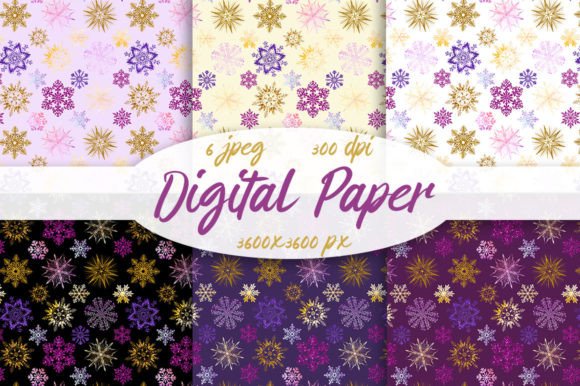
Patterns Christmas SnowFlakes, Seamless
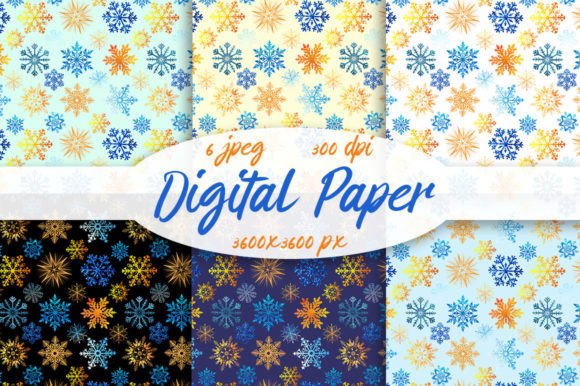
If you're designing holiday cards, wrapping paper, social media banners, or printable party kits, Patterns Christmas SnowFlakes, Seamless offers a practical, high-resolution solution—six carefully crafted digital papers that tile perfectly without visible seams. Each file is 3600×3600 pixels at 300 dpi, optimized for both digital use and professional print. But before adding them to your project—or worse, your cart—it’s worth pausing to consider how these files actually work in real-world design scenarios.
What “Seamless” Really Means (and Why It Matters)
A seamless pattern repeats edge-to-edge without gaps, misalignments, or abrupt visual breaks. With Patterns Christmas SnowFlakes, Seamless, this means each JPEG can be tiled infinitely in design software like Adobe Photoshop, Illustrator, Canva, or Affinity Designer—ideal for backgrounds, fabric mockups, or large-format prints. But here’s where many users stumble: assuming “seamless” guarantees automatic compatibility with every tool or output method.
For example, some beginners drop the JPEG into Canva’s background uploader and expect perfect tiling—only to find faint lines or subtle shifts at the edges. That’s not a flaw in the pattern; it’s often a mismatch between how the platform handles repeat settings and how JPEGs behave natively. Unlike vector-based or SVG tile patterns, JPEGs require manual tiling or proper layer blending modes in advanced editors. If your workflow relies heavily on drag-and-drop simplicity, confirm your tool supports seamless JPEG repetition—or plan to use a quick tiling script or plugin.
The Monitor Trap: Why Your Preview Might Mislead You
You’ll see the note: “Colors may vary slightly due to different color monitors.” This isn’t boilerplate caution—it’s critical context. Snowflakes rendered in cool silver-blue tones on one screen may appear warmer or more muted on another, especially if you’re working on a laptop without color calibration. When printing greeting cards or branded merchandise, that variance can mean the difference between crisp winter elegance and a washed-out, off-season look.
A common oversight? Skipping soft proofing before final export. If you’re sending files to a print-on-demand service like Printful or a local printer, always convert your working document to their recommended color profile (usually CMYK or sRGB) and preview using soft proofing tools. Better yet: order a physical test print first. One small business owner used Patterns Christmas SnowFlakes, Seamless for custom gift tags—only to discover her printer interpreted the icy white as slightly cream-toned. A single $5 sample saved her from reordering 500 units.
Size Isn’t Everything—But Resolution Is Non-Negotiable
At 3600×3600 pixels and 300 dpi, these files deliver clarity for letter-sized prints and beyond—even up to 12×12 inches at full resolution. Yet some users mistakenly assume higher pixel dimensions automatically translate to better scalability across all formats. Not quite. JPEGs are raster-based: enlarge too far, and you’ll hit pixelation. If you need scalable snowflake motifs for logos or embroidery digitizing, these papers won’t substitute for vector assets—but they’re excellent for surface design, scrapbooking, web headers, or packaging mockups where texture and repetition matter more than infinite scaling.
Before downloading, ask yourself: What’s my primary output? If it’s Instagram Stories or email headers, even 1800×1800 would suffice. But if you’re designing a 24×36-inch poster or wallpaper for a boutique storefront, the full 3600×3600 size ensures sharpness at print-ready scale.
File Format Realities: Why JPEG Works (and When It Doesn’t)
JPEG offers wide compatibility and smaller file sizes—great for fast loading and broad software support. But it doesn’t support transparency. So if your project needs snowflakes over colored backgrounds or layered effects (like a frosted glass overlay), you’ll need to mask or blend manually—not a dealbreaker, but something to factor into your editing time.
Compare this to PNG versions of similar patterns: they’d include alpha channels, allowing clean overlays without erasing backgrounds. But since Patterns Christmas SnowFlakes, Seamless ships as JPEG only, build in five to ten minutes per design to refine edges or adjust contrast so snowflakes pop against darker or busier base layers.
Matching Intent With Use Case
These six patterns vary in density, scale, and motif arrangement—from delicate single flakes to clustered, swirling arrangements. Don’t default to “the prettiest one.” Instead, match pattern rhythm to purpose:
- Subtle branding: Choose a low-contrast, widely spaced flake for watermarks or minimalist stationery.
- Festive energy: Opt for denser, overlapping designs when creating party invites or digital countdown graphics.
- Print consistency: Test one pattern across multiple paper stocks (matte vs. glossy) before bulk printing—texture affects how fine details read.
One educator used a lighter snowflake pattern as a calm, wintry backdrop for printable classroom worksheets—only to realize students with dyslexia found the subtle repetition visually fatiguing. Switching to a bolder, higher-contrast variation improved readability significantly. Context shapes function.
Before You Download or Buy
Check three things first:
- Your software’s repeat capability: Does it auto-tile JPEGs, or will you need to duplicate and align manually?
- Your output medium: Screen-only? Print? Merchandise? Each has different resolution and color expectations.
- Licensing scope: Confirm whether personal, commercial, or extended use is permitted—especially if selling physical products featuring the pattern.
And remember: seamless doesn’t mean effortless. It means intentional. These six Patterns Christmas SnowFlakes, Seamless files give you flexibility, fidelity, and seasonal charm—but only when paired with thoughtful prep and realistic expectations.
Use them to elevate, not automate. Let the snowflakes set the tone—not carry the entire design load.