Pastel Marble Patterns for Creative Projects
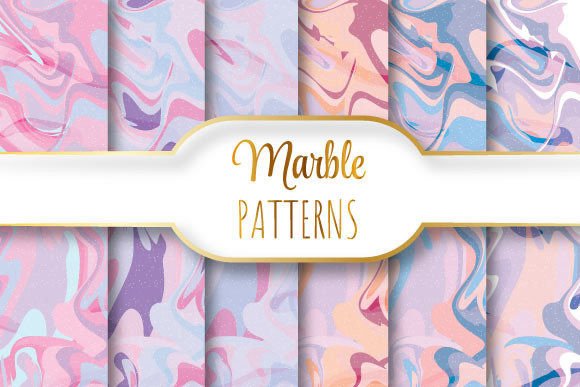
Imagine soft swirls of blush pink, misty lavender, and seafoam green blending like watercolor in slow motion—gentle, elegant, and endlessly versatile. That’s the essence of Pastel Marble Patterns: subtle, sophisticated, and designed to bring calm sophistication to any design without overwhelming it.
These aren’t gritty, high-contrast marbles or bold statement textures. Instead, they’re refined, low-saturation interpretations—think of marble you’d see in a serene spa lobby, a minimalist café menu, or the cover of a mindful journal. Each pattern flows smoothly, with delicate veining and gentle tonal transitions that feel organic, not artificial.
Why Seamless Repeating Vector Patterns Matter
A seamless repeating vector pattern means the design tiles perfectly—no visible edges, no awkward breaks when repeated across a surface. This is essential whether you're wrapping a product box, designing stationery, or creating a website background. Because these patterns are built as vectors (in EPS 10 format), they scale infinitely without losing sharpness—ideal for both tiny business cards and large-format wall decals.
The included JPEG files (six high-res versions at 3600 × 3600 pixels, 12 × 12 inches, 300 dpi) give you ready-to-use raster options for quick digital mockups, social media posts, or print-ready layouts where vector editing isn’t needed. The single EPS file ensures full editability in Adobe Illustrator or compatible software—you can recolor, adjust contrast, or isolate elements with precision.
Where Pastel Marble Patterns Shine in Real Life
Small business owners often use these patterns to elevate everyday assets—think custom thank-you cards for online orders, branded packaging inserts, or subtle backgrounds for email newsletters. A pastel marble texture adds quiet luxury without shouting for attention, helping your brand feel thoughtful and intentional.
Creatives and educators find them especially useful for printable resources: lesson plan templates, mindfulness worksheets, or classroom décor posters. The soft tones reduce visual fatigue—great for students or anyone spending long hours on screen or paper.
Bloggers and content creators apply them as Instagram story backgrounds, Pinterest pin overlays, or even subtle textures behind text in Canva designs. Because the patterns are light and airy, they don’t compete with photography or typography—they support it.
Freelancers building client presentations often drop one of these patterns into slide decks or proposal covers. It’s an instant upgrade from plain white or generic stock textures—professional, cohesive, and quietly distinctive.
Practical Tips Before You Use Them
First, consider your output medium. If you’re preparing files for professional printing (like brochures or fabric swatches), stick with the EPS version—it preserves crisp edges and allows color adjustments in CMYK. For web use—social graphics, blog headers, or email banners—the JPEGs are fast-loading and display consistently across devices.
Remember that pastel doesn’t mean “faint.” These patterns have enough contrast to remain legible under text, but if you plan to overlay dark type, test readability at actual size. A quick tip: try adding a 5–10% white overlay or subtle drop shadow to ensure clarity without dulling the marble’s softness.
Because each pattern repeats seamlessly, you’ll get clean results when tiling across large surfaces—but avoid stretching the JPEGs beyond their native 3600 × 3600 pixel dimensions. While they’re high-res, extreme enlargement may soften fine details. For oversized prints (e.g., murals or banners), start from the EPS and scale there.
Getting Started Is Simple
You don’t need advanced design skills to begin. Open a JPEG in Canva, Photoshop, or even PowerPoint, and use it as a background layer. Adjust opacity slightly (85–95%) if you want the marble to recede gently behind text or icons. In Illustrator, place the EPS, then use the Recolor Artwork tool to shift hues—try warming up the pinks or cooling the blues to match your brand palette.
For packaging designers, try applying the pattern to a die-line template using the “Pattern Options” panel—set spacing to zero and check “Dim Images” for accurate preview. Printers will appreciate the clean vector paths and embedded color profiles in the EPS file.
Who Benefits Most—and Why
Beginners love how little setup these patterns require—no learning curves, no plugins, no complex tutorials. Just unzip, open, and use. Yet professionals appreciate the technical rigor: true 300 dpi resolution, industry-standard EPS 10 compatibility, and deliberate color balancing for both screen and print fidelity.
Hobbyists crafting handmade goods—like ceramic coasters or hand-bound notebooks—scan or trace the patterns for laser engraving templates or heat-transfer designs. Educators print them onto cardstock for tactile learning tools or calming sensory cards. Entrepreneurs building subscription boxes use them to unify unboxing experiences—wrapping tissue, insert cards, and sticker sheets all sharing the same quiet elegance.
Even if you’re just refreshing your personal portfolio site or redesigning your LinkedIn banner, a well-placed Pastel Marble Pattern adds cohesion and calm authority—without requiring a full rebrand.
What Makes These Files Stand Out
It’s not just about aesthetics—it’s about usability baked in. The zip contains exactly what you need, nothing extra: one fully editable EPS and six JPEG variants (likely offering slight tonal or contrast variations—ideal for testing different moods or applications). No hidden layers, no locked assets, no confusing naming conventions.
The 12 × 12 inch / 3600 × 3600 pixel size strikes a practical balance: large enough for detailed inspection and precise cropping, yet manageable for most systems. And because it’s delivered as a single zip, there’s no hunting through folders or deciphering version numbers—just extract and go.
Most importantly, these patterns respect your time and creative intent. They’re not trying to be everything—they’re designed to do one thing beautifully: add quiet, confident texture to your work. Whether you're launching a wellness app, designing a wedding suite, or updating your Etsy shop banner, Pastel Marble Patterns offer a grounded, graceful foundation—not a distraction.